
Quick Answer: Choose an in-house team if you have a stable monthly marketing budget above roughly ₹4–5 lakh, need daily hands-on control, and your product…
Blogs
Why Isn't Your Website Generating Leads? 9 Real Reasons + How to Fix Them

Quick Answer: Your website is not generating leads for one of three main reasons:
- You are attracting informational traffic instead of buyer intent.
- Your homepage fails the 5-second message-match test.
- Friction in your forms, CTAs, or follow-up process is killing intent.
Fixing this rarely needs a redesign — it needs an honest diagnosis and a few high-leverage tweaks.
The scenario: You check analytics on Monday morning. Traffic is up 22% month over month. Rankings look healthy. Bounce rate is “okay.” But the inbox? Three inquiries, and two are cold pitches from SEO agencies.
Sound familiar?
You are not alone. HubSpot’s marketing research shows that 61% of B2B marketers say lead quality is their number one challenge, and the average website conversion rate still sits at just 2.35%. So if your website is not generating leads even after months of SEO and content investment, the gap is fixable — usually without a full rebuild.
This guide walks you through the honest diagnostic framework we use with clients: Traffic → Message → Experience → Offer → Follow-up. Read it end to end and you will know exactly where your funnel is leaking.
First, Diagnose: Is It a Traffic Problem or a Website Problem?
Before touching a single button colour, answer two questions.
1. Is your traffic actually relevant?
Pull a Search Console report. If your top queries are “what is [industry term]” or “how does X work,” you are ranking for informational intent — curious readers, not buyers. That is why website traffic is not converting.
2. Where do visitors drop off?
Open GA4 and Microsoft Clarity side by side. High bounce on the landing page usually signals a speed or message-match failure. A drop-off at the form points to friction. Inquiries submitted but never answered point to broken follow-up.
| Signal | Likely Problem |
|---|---|
| High traffic, low bounce, no form fills | Weak CTA or offer |
| High bounce (>70%) within 10 seconds | Speed or headline mismatch |
| Form started but abandoned | Too many fields or trust issue |
| Form submitted, no follow-up email | Broken tech / notification setup |
| Traffic from unrelated countries or viral posts | Wrong-audience problem |
If your traffic is genuinely relevant and you still see zero conversions, the website is the bottleneck.
The 9 Real Reasons Your Website Is Not Generating Leads
1. You Are Attracting the Wrong Traffic
A viral LinkedIn post or a top-of-funnel blog can pad session counts without moving revenue. Neil Patel’s analysis of 10,000 websites found that organic social contributes only about 6.4% of qualified traffic on average. Meanwhile, buyer-intent keywords (“hire,” “pricing,” “near me,” “vs,” “best for [use case]”) convert five to ten times better than pure informational terms.
Fix: Rebuild your keyword map around commercial and transactional intent. Add location and industry modifiers. Kill or repurpose thin blog posts that attract visitors who will never buy.
Time to fix: 1–2 weeks (research + content audit)
2. Your Value Proposition Fails in Under 10 Seconds
Read your homepage headline to a friend outside your industry. Ask two things: what does this company do, and why does it matter to me? If they cannot answer both in ten seconds, the headline is the reason your website is not generating leads.
Most homepages talk about the company — awards, years of experience, methodology. Buyers care about outcomes.
Fix template: [Specific outcome] for [audience] without [pain point].
Example: “Award-winning digital agency since 2012” → “More qualified demos for B2B SaaS teams — without hiring another SDR.”
Time to fix: 45 minutes
3. Slow Page Speed Is Silently Losing You Leads
Google’s Core Web Vitals research shows 40% of users abandon a page that takes more than three seconds to load, and mobile users bail even faster. Every additional second past the two-second mark drops conversion by roughly 7%.
Fix:
- Run your homepage and top landing page through PageSpeed Insights.
- Compress hero images (WebP, under 150 KB).
- Lazy-load below-the-fold images and videos.
- Cut third-party scripts you no longer need (old chat widgets, unused pixels).
- Target a Largest Contentful Paint under 2.5 seconds.
Time to fix: 2–4 hours (or 1 day if hiring a dev)
4. Your Website Call to Action Is Vague or Buried
“Submit.” “Learn More.” “Click Here.” These describe the action, not the reward. They pull visitors out of momentum instead of into it.
The rule I give every client: one primary CTA per page, plus one low-commitment secondary CTA. The primary is for the ready-to-talk visitor. The secondary is for the researcher who is not there yet.
| Weak Website Call to Action | Stronger Rewrite |
|---|---|
| Contact Us | Get a Free 15-Minute Website Audit |
| Submit | Send Me the Free Checklist |
| Learn More | See How We Cut Their Cost per Lead by 47% |
| Sign Up | Start My 7-Day Trial (No Card) |
Rewriting CTAs alone has produced 20–60% lifts for landing pages in our own portfolio without any traffic or design changes.
Time to fix: 30 minutes
5. Your Landing Page Is Not Built for Conversion
A lead generation website needs dedicated campaign landing pages, not a homepage doing every job at once. The Unbounce Conversion Benchmark Report shows dedicated landing pages convert two to three times better than homepages for the same traffic source.
A high-converting landing page has:
- One hero message that matches the ad or search intent
- Three to five outcome-focused benefits
- Real social proof (named clients, video testimonial, case study snippet)
- One primary CTA repeated at natural decision points
- A short FAQ that handles the top three objections
- No global navigation menu that lets visitors escape
Small change, big landing page conversion impact.
Time to fix: 1 day per landing page
6. Your Forms Are Killing Conversions
HubSpot’s form conversion research found that cutting fields from 11 to 4 lifted conversions by up to 120%. Yet most B2B sites still ask for company size, role, phone, industry, and budget on a first-touch form.
Fix:
- Ask only for what you need to send the next email (name, email, one qualifier).
- Split long forms into multi-step forms — visitors are more likely to finish once they have started.
- Use progressive profiling: capture more fields on the second and third visits, not the first.
- Add a real phone number and WhatsApp option near the form for high-ticket services.
When should forms stay longer? Enterprise sales, high-ticket consulting, or when your sales team’s time is more expensive than the lost leads.
Time to fix: 20 minutes
7. There Is No Trust and No Social Proof
Design polish does not build trust. Specifics do. Missing testimonials, no client logos, no case studies, no author bios, no security badges near forms — every missing signal quietly raises the visitor’s risk.
Fix:
- Add three named testimonials with photos and job titles above the fold or near the primary CTA.
- Show a logo strip of five to eight recognisable clients or publications.
- Publish two or three short case studies with real numbers (before → after → time frame).
- Add a founder photo and byline on the About page.
- Place a trust badge (SSL, refund guarantee, review score) within 100 pixels of every CTA.
Time to fix: 3–5 hours (once you have the assets)
8. There Is No Clear Conversion Path or Sales Funnel
Visitors do not know what step comes next because you never designed one. This is the most common reason website traffic is not converting on service and SaaS sites.
Fix — map the buyer journey:
| Stage | Page Job | Contextual CTA |
|---|---|---|
| Awareness | Blog post, guide | “Get the free playbook” |
| Consideration | Comparison, case study | “See the 10-min product tour” |
| Decision | Pricing, demo page | “Book a call with a specialist” |
Every page should have one obvious job and one CTA that matches the visitor’s stage. This is the heart of how to generate leads from website content that already ranks.
Time to fix: 1 week (mapping + implementation)
9. You Are Not Following Up Fast Enough (Or At All)
Harvard Business Review’s classic study on online sales leads found companies that respond within five minutes are nine times more likely to convert them, compared to responding within an hour. Yet many businesses lose form submissions to spam filters, broken notifications, or “we will get back in 24 to 48 hours” auto-responders.
Fix:
- Connect your form directly to your CRM plus Slack or WhatsApp alerts.
- Send a real, human confirmation email within 60 seconds.
- Audit your form submissions weekly — send a test entry every Monday.
- Set an internal SLA: first human reply within 15 minutes during business hours.
The fastest conversion win is not a new website. It is answering the phone.
Time to fix: 1 hour
A 6-Step Website Conversion Optimization Framework
This is the same conversion rate optimization (CRO) framework we run with clients. Work through it in order — do not skip to step 5.
- Audit. Run a technical, UX, and messaging audit. Tools: PageSpeed Insights, Microsoft Clarity, Screaming Frog, a manual 10-second headline test.
- Diagnose. Match analytics data to the drop-off table above. Find the one biggest leak.
- Prioritise. Score every fix on Impact × Confidence × Ease (ICE). Do the top three first.
- Rewrite. Fix the value proposition, headline, and primary CTA before touching design.
- Test. A/B test one variable at a time. Do not change the headline and the form in the same test.
- Track and iterate. Set a monthly benchmark. Aim for a website conversion rate of 2–5% for small business, 8–12% for optimised landing pages.
Want to shortcut this? Grab the free Website Lead-Gen Audit Checklist below and score your own site in 20 minutes.
2026 Website Conversion Rate Benchmarks (By Industry)
Global averages are useful, but your industry benchmark matters more. Here is what “good” looks like this year, blending Unbounce, WordStream, and Ruler Analytics data:
| Industry | Average Conversion Rate | “Good” Benchmark |
|---|---|---|
| SaaS (free trial) | 3.1% | 6%+ |
| B2B services / consulting | 2.4% | 5%+ |
| Legal | 2.6% | 6%+ |
| Real estate | 2.9% | 5%+ |
| Higher education | 2.5% | 5%+ |
| E-commerce | 2.1% | 4%+ |
| Local services (plumbing, dental) | 3.3% | 8%+ |
If you sit under the industry average, your fastest path to more revenue is not more traffic. It is a better funnel.
Your Quick-Win Website Lead Generation Checklist
Screenshot this and audit your own site:
- ☐ Headline passes the 10-second outsider test
- ☐ One primary CTA visible above the fold
- ☐ Contact form has five or fewer fields
- ☐ Phone number in top-right and sticky on mobile
- ☐ Homepage loads in under three seconds on 4G
- ☐ Live chat or WhatsApp button on service pages
- ☐ Three named testimonials with photos
- ☐ Two case studies with real numbers
- ☐ Thank-you page tells the visitor the next step
- ☐ Form submissions land in inbox and CRM within 60 seconds
- ☐ Trust badge within 100 pixels of every CTA
- ☐ Every blog post has a contextual, stage-matched CTA
Aim for 10 out of 12. Anything less is quietly costing you leads every week.
Common Mistakes to Avoid When Trying to Increase Website Leads
- Redesigning the entire site before diagnosing where the funnel actually breaks.
- Copying a competitor’s CTA without knowing whether it works for them.
- Running A/B tests on pages with fewer than 1,000 monthly visitors — the math will lie to you.
- Chasing more traffic when the real leak is on the page.
- Gating every piece of content and starving top-of-funnel interest.
When to DIY vs Bring in a CRO Specialist
You can handle most of this yourself with three to five hours a week and a willingness to write. Copy rewrites, form-field cuts, CTA tests, and speed fixes are all within reach.
Bring in a specialist when:
- You have solid traffic (5,000+ monthly visits) but a stubborn sub-2% conversion rate.
- You have already fixed the obvious issues and need statistical A/B testing.
- Your funnel spans multiple stages and needs proper attribution.
If you want an outside pair of eyes first, we offer a free 15-minute homepage teardown — no pitch, just the top three things you can fix this week.
Turn Your Website Into a Lead-Generation Asset
A website not generating leads is almost never a design problem. It is a diagnosis problem. Traffic quality, message match, page speed, CTA clarity, form friction, trust signals, funnel logic, and follow-up — one of these eight levers is where your leads are quietly leaking away.
Start with the free checklist above. Fix the top three issues. Measure for four weeks. Then decide whether you need help going further.
If you want the audit done for you, book a free 15-minute teardown → — we will show you the top three fixes for your specific site, and you take it from there.
FAQs
Why is my website not generating leads even though I get traffic?
Traffic without leads usually means one of three things — the traffic is the wrong audience, the homepage fails the message-match test in under 10 seconds, or there is friction in your CTA or form. Fixing a website that isn’t generating leads rarely requires a full redesign, just an honest audit in that order.
How long does it take to increase website leads after fixing conversion issues?
Most small businesses see measurable improvement within four to eight weeks. Quick wins like rewriting a headline, cutting form fields, or speeding up a page can lift website lead conversion within days. Bigger structural fixes to funnel and content strategy typically take a full quarter to show stable results.
What is a good website conversion rate for a small business in 2026?
A healthy website conversion rate for small business sites falls between 2% and 5%, depending on industry. Local service businesses often reach 5–8%. Optimised landing pages can hit 10% or higher. If you are under 2%, the friction is usually in your CTA, form length, or message-match — not your traffic.
How do I get more leads from my website without more traffic?
The fastest way to increase website leads without buying more traffic is conversion rate optimization (CRO). Rewrite your headline for outcome clarity, cut form fields to four or fewer, add one strong testimonial near your primary CTA, and speed up your homepage. These four fixes alone often double lead volume.
Is the problem my website or my traffic?
Check two things. First, are your top Search Console queries buyer-intent or curiosity-driven? Second, where do visitors drop off in GA4? If traffic is relevant but people bounce on the landing page, the site is the issue. If queries are informational, your keyword strategy is why website traffic is not converting.
How many CTAs should a landing page have?
One primary website call to action, repeated two or three times down the page, plus one low-commitment secondary CTA for visitors not ready to talk yet. Multiple competing CTAs create decision fatigue and lower landing page conversion. Keep the primary action visible without scrolling on both desktop and mobile.
SEO for Higher Education: Boost Rankings, Enquiries & Enrollment
Quick Answer: SEO for higher education means optimising university and college websites so prospective students find relevant programmes on Google before competitors do. It combines…
How Schools Can Increase Admissions Through SEO
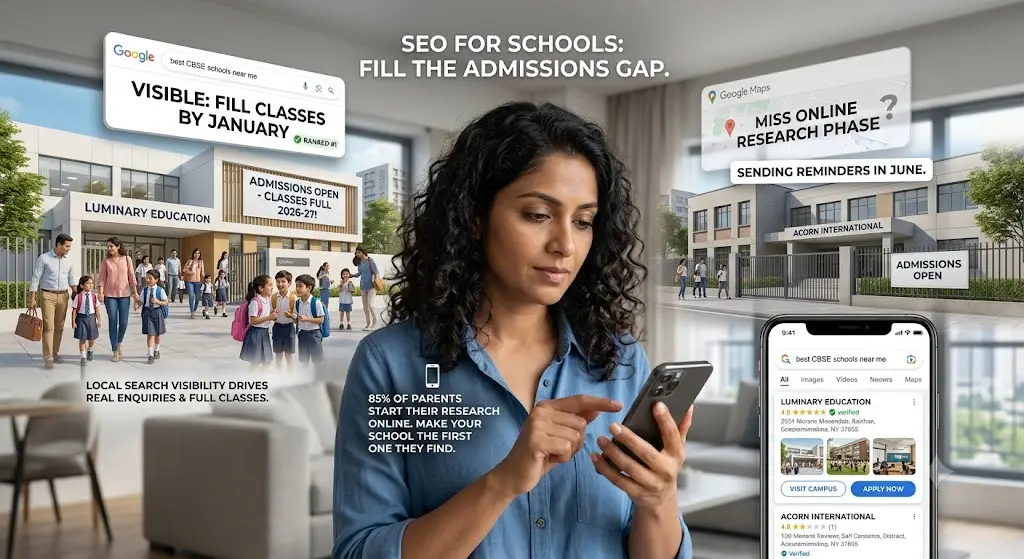
Two schools sit three kilometers apart. Same board, similar fees, comparable results.
One fills every seat by January. The other is still sending reminder emails in June.
The difference is rarely academic. It usually comes down to who shows up first when a parent searches “best CBSE school near me” on Google.
That’s what SEO for schools actually solves — the gap between running a good school and being a school parents can actually find.
Answering “how do we get more admission enquiries” is harder than it sounds, because school search behaviour, board-specific keywords, and hyper-local competition don’t follow the same playbook as regular business SEO.
By the end of this post, you’ll know how school search visibility works, why it drives real enquiries and not just traffic, and the best SEO strategies for schools you can start using this admission cycle.
Why Schools Are Losing Admissions Before Parents Even Visit
Most schools still market the old way — hoardings near the gate, newspaper ads before admission season, and referrals built over years.
None of that shows up when a parent searches at 11 pm from their phone.
Over 85% of parents now research schools online before shortlisting one for a visit. If your school stays invisible during that research phase, you lose the enquiry before you even know it existed.
How Parents Actually Search for Schools Today
Parents rarely type your school’s name first. They search by need — “CBSE school near me,” “best school in [city] for primary,” or “school with day boarding near [locality].”
Google’s own local search data backs this up: close to half of all searchers default to a regular Google search for anything location-based, and a large share search directly inside Google Maps.
That means your Google Business Profile carries as much weight as your homepage — sometimes more.
Search your school’s name on Google right now. If your address, phone number, or admission link is outdated, fix it today — before reading any further.
What Is SEO for Schools, and Why Does It Matter for Admissions?
SEO for schools means making your website and Google listing easy to find for parents actively searching for education options in your city or locality.
It isn’t only about ranking for one exact phrase. It’s about ranking for every real question a parent asks before filling out an admission form.
Done right, it becomes one of the most reliable school marketing strategies available, because it targets people already looking for a school, not people who might become interested someday.
Some schools build this in-house. Others bring in school SEO services or wider education SEO services to move faster. Either way, SEO belongs inside your overall digital marketing for schools plan, not as a separate side project.
The Real Benefits of Ranking Higher (Not Just Traffic)
| Benefit | What It Means for Your Admissions Team |
| More qualified enquiries | Parents already searching for schools like yours find you first |
| Lower cost per enquiry | Organic visibility keeps working after you stop paying for ads |
| Trust before the first call | A well-ranked, review-rich listing builds credibility before a parent visits |
| Longer visibility window | Content built once keeps generating enquiries across admission cycles |
| Sharper local reach | Local SEO for schools puts you in front of families inside your exact catchment area |
A verified Google Business Profile alone gets close to 200 clicks or actions a month on average. For a school in a competitive locality, that’s 200 chances to turn a search into a campus visit.
Local SEO agencies working with schools commonly report a visible jump in click-to-call and direction-request activity right as admission season peaks, once that profile is fully optimised.
Local SEO for Schools vs. Generic SEO for Educational Institutions
Not all SEO for educational institutions looks the same. A university competing nationally needs a different approach than a neighbourhood K-12 school competing on locality and board.
Local SEO matters far more than chasing national rankings for broad terms, especially for most CBSE, ICSE, and state board schools.
Here’s the practical difference.
Local SEO for Schools
This layer focuses on:
- Google Business Profile accuracy — name, address, phone number, timings, photos
- Separate pages for each branch, if your school runs more than one campus
- Reviews from parents and alumni
- Local backlinks from community sites, news outlets, and directories
This layer decides whether you show up in the map pack when someone nearby searches “school near me.”
Website and Content SEO
This layer covers:
- Admission pages built around board, class, and fee-related searches
- Blog content answering real parent questions — fees, curriculum, transport, safety
- A fast, mobile-first website
- Structured data, so Google can show your fees, ratings, and FAQs directly in search results
Both layers work together. Skip one, and you cap how many admission enquiries your website can generate.
Before your next admission cycle opens, list every question your front office answers on the phone. Each one is a blog post you haven’t written yet — and a search another school nearby is currently answering instead of you.
How to Optimise Your School Website for SEO
You don’t need a large team to start. You need the right order of operations.
8 SEO Strategies for Schools You Can Start This Quarter
- Claim and complete your Google Business Profile — add photos, timings, board affiliation, and reply to every review. (Time: 30 mins)
- Add location and board keywords naturally to your homepage, admissions page, and footer. (Time: 1 hour)
- Create a separate page for each class or stream you admit into — nursery, primary, secondary, senior secondary. (Time: Half a day)
- Publish direct answers to real questions — fees, transport routes, hostel facilities, exam results. (Time: Ongoing)
- Fix page speed by compressing images and removing unused plugins; a slow admission form loses enquiries. (Time: 2-3 hours)
- Keep the enquiry form visible on every page, not buried inside a “Contact Us” tab. (Time: 1 hour)
- Build local citations by listing your school consistently across education directories, local listings, and board-specific portals. (Time: Ongoing)
- Track enquiries by source every month, so you know which keywords bring admissions, not just clicks. (Time: 15 mins/month)
What Most Schools Get Wrong
Many schools treat their website like a digital brochure — static, occasional, rarely touched after launch.
Search engines reward the opposite. They favour pages that get updated, questions that get answered, and content that keeps matching what parents actually type into Google.
A school updating its site every month will consistently outrank one that redesigned once and never touched it again.
Pick one page right now — your admissions page. Check if it answers a parent’s fee, eligibility, and process questions in under 30 seconds. If it doesn’t, that’s this week’s fix.
Conclusion
SEO for schools isn’t a one-time project. It’s how your admissions office stays visible every single day parents are searching.
Get your Google Business Profile right, build local search visibility around your exact catchment area, and answer parent questions before your competitors do.
Schools that treat this as ongoing work see more admission enquiries at a lower cost, cycle after cycle.
Start with your Google Business Profile today. It’s the one search-visibility fix you can finish in ten minutes that changes what parents see on their very next search.
Frequently Asked Questions
What is SEO for schools?
SEO for schools means optimising a school’s website and Google listing so parents can find it while searching for education options nearby. It covers keywords, local search, page speed, and content that answers admission-related questions. Done well, it turns search traffic into genuine admission enquiries instead of passive visitors.
How can SEO increase school admissions?
SEO increases admissions by putting your school in front of parents at the exact moment they’re searching for options. Ranking for local, board-specific, and fee-related searches brings warmer enquiries than untargeted ads, and lowers your cost per enquiry over time.
Why do schools need SEO?
Schools need SEO because most parents research online before shortlisting a school to visit. If your website and Google Business Profile aren’t optimised, a nearby competitor with stronger search visibility captures that enquiry instead of you.
What is local SEO for schools?
Local SEO for schools means optimising your Google Business Profile, location pages, and citations so you rank for “near me” and locality-based searches. It includes accurate contact details, parent reviews, and local backlinks that decide whether you appear in Google’s map results.
How do parents search for schools online?
Parents typically search using need-based phrases like “CBSE school near me” or “best school in [city] for primary,” rather than a school’s name. Many searches happen on mobile, often outside school hours, which is why local SEO matters just as much as a mobile-friendly website.
How can schools generate admission enquiries online?
Schools generate enquiries online by combining local SEO, an easy-to-find enquiry form, and content that answers real parent questions about fees and admissions. Visible, updated Google Business Profiles paired with fast websites convert far more searches into calls and campus visits.
Digital Marketing Services for Colleges & Universities in Pune
Your admissions team spends ₹40 lakh a year on marketing, yet your best enquiry source is still a parent who heard about you from a…
Is Your College Ready for AI Search? Here's What You Need to Know
A student in Mumbai opens ChatGPT and types: “Which private engineering college in Pune has the best placement record under 1.5 lakh fees?” Your college…
How We Grew a Pune Coaching Institute's Google Maps Ranking from #7 to #2 in 60 Days
Your competitor’s coaching class shows up first on Google Maps. Yours doesn’t — even though you’ve been running for longer and your results are better.…
How E-E-A-T (Experience, Expertise, Authority, Trust) is Reshaping Indian Brand SEO
Your content ranks today and disappears next month — and you have no idea why. Sound familiar? This is the reality for hundreds of Indian…
Local SEO for Pune Businesses: How Regional Brands Dominate Search
Key Takeaways 46% of all Google searches have local intent — Pune businesses that ignore local SEO are invisible to their most ready-to-buy customers. Fully…
Why Universities Need Brand Positioning Beyond Admissions Season
When the Brochures Stop, Does Your University Still Exist? Most universities go silent after June. The hoardings come down, the admission counsellors take a breather,…